
Reverse reverb
Shields
A reverse reverb that swells in before it decays, fitted to captures of a classic late-'80s reverb unit.
- Coming soon
- v1.1.1
Buy Now
Coming soon
About Shields
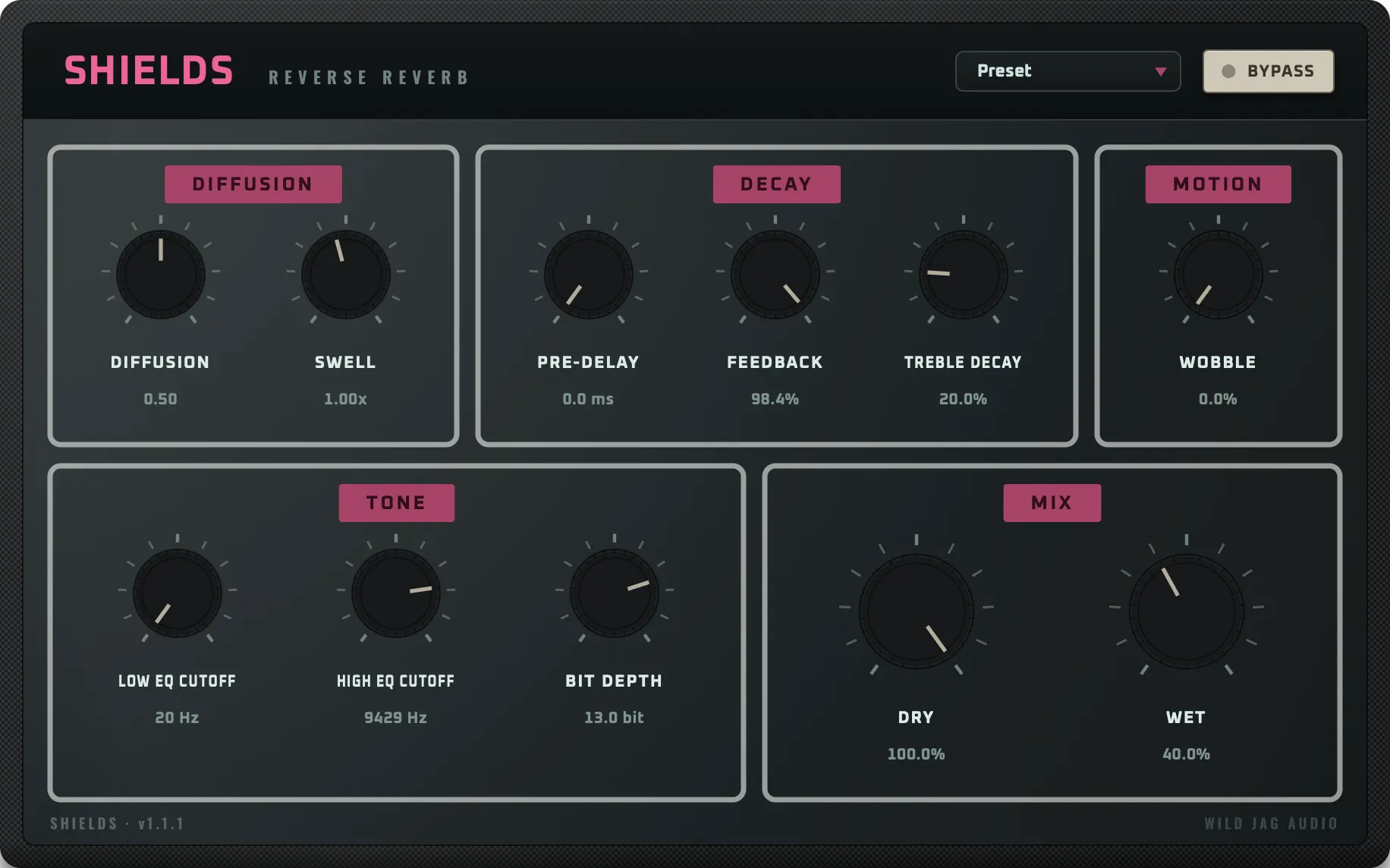
Shields is a diffuse algorithmic reverse reverb built around the "Bloom" program of a classic reverb unit from the late '80s: a shoegaze favorite in which the reverb dramatically swells in before it decays.
Its engine was fitted to captures of the original hardware with a custom machine learning pipeline, so at its default settings the swell, decay, and tone all follow the hardware's exact behavior. From there, you can take it into totally new sonic territory, finally able to adjust it's parameters (the original was just one set sound), with added features and configuration options like Wobble, or Bit Depth, which doesn't exist on the original hardware at all.
Hear it in action
Shields Demos
- BloomGuitar Picking1:09
- ShatteredSynth Arp0:15
Features
- Classic shoegaze reverb, with a swelling attack and long decay.
- Engine fitted to impulse response captures of the original MidiVerb II hardware via a proprietary machine learning pipeline.
- At its defaults, the swell, decay and tone follow the mythical Bloom patch to a tee. But there's plenty more to explore from there.
- Wobble: a new control that blurs the tank's resonant peaks into slow motion.
- Bit Depth from 4 to 16 bit - the original was 13, this allows you to get more hifi or lofi on demand.
Controls
Diffusion
| Control | Range | What it does |
|---|---|---|
| Diffusion | 0.30–0.70 | Smears the input before it reaches the reverb, changing how quickly discrete echoes blur into a smooth wash. |
| Swell | 0.25×–4.00× | The attack control. Larger values slow the swell and stretch the whole decay; smaller values tighten it. |
Decay
| Control | Range | What it does |
|---|---|---|
| Pre-Delay | 0–200 ms | Extra time before the swell begins. |
| Feedback | 0–100% | Decay time of the reverb tank. At 98.4% it matches the original hardware. |
| Treble Decay | 0–100% | How much faster the tail's highs die away than its lows. Higher values darken the tail as it decays. |
Motion
| Control | Range | What it does |
|---|---|---|
| Wobble | 0–100% | Slow drift on the tank's delay lines, blurring its resonant peaks into gentle motion. Off at 0%. |
Tone
| Control | Range | What it does |
|---|---|---|
| Low EQ Cutoff | 20–200 Hz | High-pass filter ahead of the reverb. Effectively off at 20 Hz. |
| High EQ Cutoff | 1–20 kHz | Low-pass filter on the output, the main brightness control. The default matches the original hardware. |
| Bit Depth | 4–16 bit | The original hardware is 13-bit. Go higher for a cleaner tail or lower for lo-fi. |
Mix
| Control | Range | What it does |
|---|---|---|
| Dry | 0–100% | Level of the unprocessed signal. |
| Wet | 0–100% | Level of the processed signal, independent of Dry. |
Global
| Control | Range | What it does |
|---|---|---|
| Bypass | — | Bypasses the plugin. |
Formats and requirements
Formats: AU, VST3, AAX, Standalone.
- macOS 11 (Big Sur) or later
- Apple Silicon Mac (M1 or newer). Intel Macs are not supported
- A host that supports AU, VST3 or AAX (or use the standalone app)
- PC formats coming soon!
A license works on up to two of your computers and is activated with the key we email you after purchase.
Alesis, MIDIVerb, and MIDIVerb II are trademarks of their respective owners. They are named only to describe the sound Shields was modeled on, and their use does not imply endorsement or affiliation.